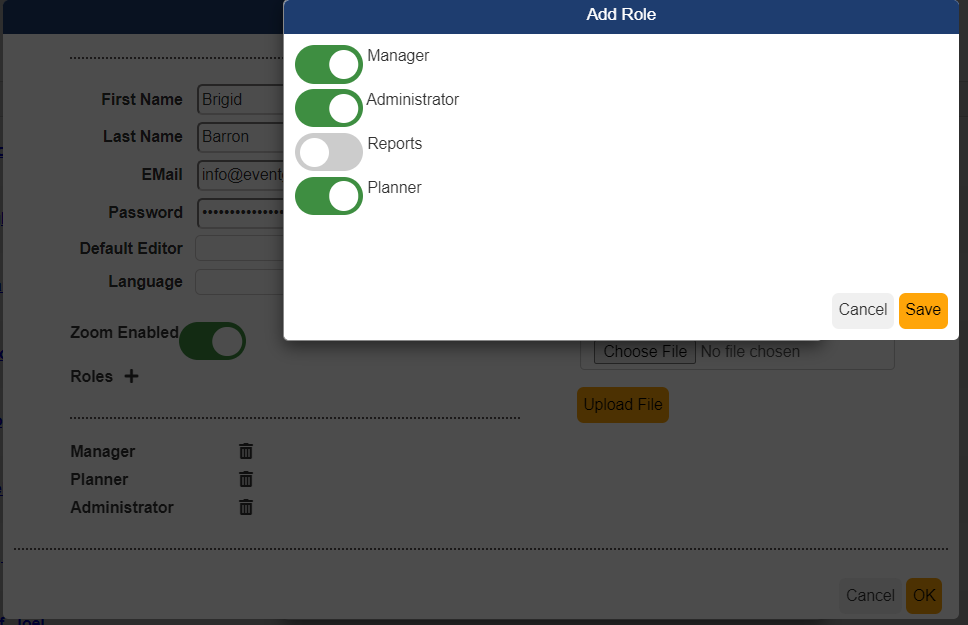
There are four access levels available for a user. You will see the access levels when you are creating a new user account or clicking on an existing user account and clicking the + besides Roles. Here is a description of each access level:
Reports is a new option that is just for users that need access to the reports section of the event to pull data
Planner is used for the person that needs access to the attendee dashboard and nothing else. This is usually the group coordinator that wants to know who has registered or to email the attendee list.
Manager is for those individuals that have had user training and need to access the full event record for events they have been assigned to as planners for the event. A manager can access the event record to modify, change or update the record as needed.
Administrator is for the person that needs access to all the events created in their system. This is typically assigned to users that are fully trained in using the system and manage all the events.
.
Was this article helpful?
That’s Great!
Thank you for your feedback
Sorry! We couldn't be helpful
Thank you for your feedback
Feedback sent
We appreciate your effort and will try to fix the article